Using Offset To Slice - Cut Out Text
On My Desk 3/16/21 - A New Chapter? Or a Return?
On my desk Tuesday March 16th, 2021 is a Silhouette Cameo 4.
Does this mean I am trading in my cricut? No. Absolutely not. This is an addition, not a replacement. I don't want to add to the drama of Cricut's decision to continue making us upload out images to their server, and now pay to store them there, but its an elephant in the room, and I can't not address it.
I don't like that this decision makes me feel like a co-conspirator in a low level con. I have spent three years telling people how to use these machines, and because of that, people have purchased them, with me telling them they did not have to pay for Cricut Access to use them. Now that that is not true [for the vast majority - some still can use it without paying] I feel like I lied to people. And that makes me more than a little annoyed with Cricut right now, a company that I have never been fully in love with, even if I do love my machine and what I can do with it.
Are my feelings rational? Too soon to tell.
For me this is a little different than for most of you. I live in the middle of nowhere with very pitiful internet. For two years I have said "I should have bought a Silhouette", because they have stand alone software that truly works offline. Cricut's version of "offline" is so limited that it's useless to me.
When Cricut made their announcement last week, and I knew I would be spending more money one way or another, it just felt like a good time to finally do what I should have done from the start - buy the machine that does not require me to be online to use it.
So am I jumping ship and switching to Silhouette? No. And yes. I did buy a Silhouette. I am not buying a new Cricut machine [at this time] but I am also not getting rid of my old one - as a matter of fact, I'm still using it this morning, and probably will continue to do so.
I am not paying for Cricut Access, at this time. Will I change my mind? Possibly. I understand that Cricut has to pay their cloud storage fees. I don't want to use their cloud storage. I should not have to upload my images to their cloud to use them. I want to use them right from my computer. Cricut is unlikely to ever offer that option, so I may eventually cave and do it their way. But I'm not quite ready to give in yet.
Please don't tell me to just "give up two coffees a month" and pay the fee. That's so... rude. One, my coffee costs roughly 33 cents a travel sized cup - I drink it black, and brewed in my kitchen. Two, for me, this is not about the ability to pay, but the willingness to do so. I could spend a little more to use my cricut the way I am accustomed to using it, or I could spend a LOT more on another company. I chose the latter. It may end up being the wrong choice, and I may change my mind. But I have the ability to make the choice, and it felt like a good time to make it.
Snapchat to my BFF
I could return the Silhouette next week. The learning curve is steep, there's no doubt about that. I have never really gotten the hang of inkscape, and Silhouette reminds me a lot of inkscape. But then, I have already found some great features in Silhouette that I love... so maybe I will end up really liking it. I just don't know. It's too soon to tell.
So this is why I currently have two machines - to find out what works best for me. Because no matter how long the pros and cons lists are for each machine, it comes down to which machine works best for the individual. What works for you may not work for me. What works for me may not work for anyone else.
What does this mean for this blog, my facebook page, and my facebook group? Not much at all. A few posts on this blog will no longer apply (and a LOT will need updated ) with the positive new updates in Design Space. Those posts didn't bring enough traffic to my blog to make much difference to me.
I will continue to post all the free fonts and free svgs that I have always posted. The only real change is that I now have two machines to complain about, instead of one. :-)
I do not work for Cricut. I do not work for Silhouette. I am not an ambassador for either company. So unlike many craft bloggers, I can say what I want about both companies. Ambassadors have signed clauses promising to not say anything disparaging about the company. I have signed no such agreement. I can be as brutally honest as I wish, about the struggles with both machines. That's what you can expect - a lot of brutal honesty (also known occasionally as whining) about both machines. Hopefully I will also be able to teach ways to work around those issues, with both machines. Only time will tell.
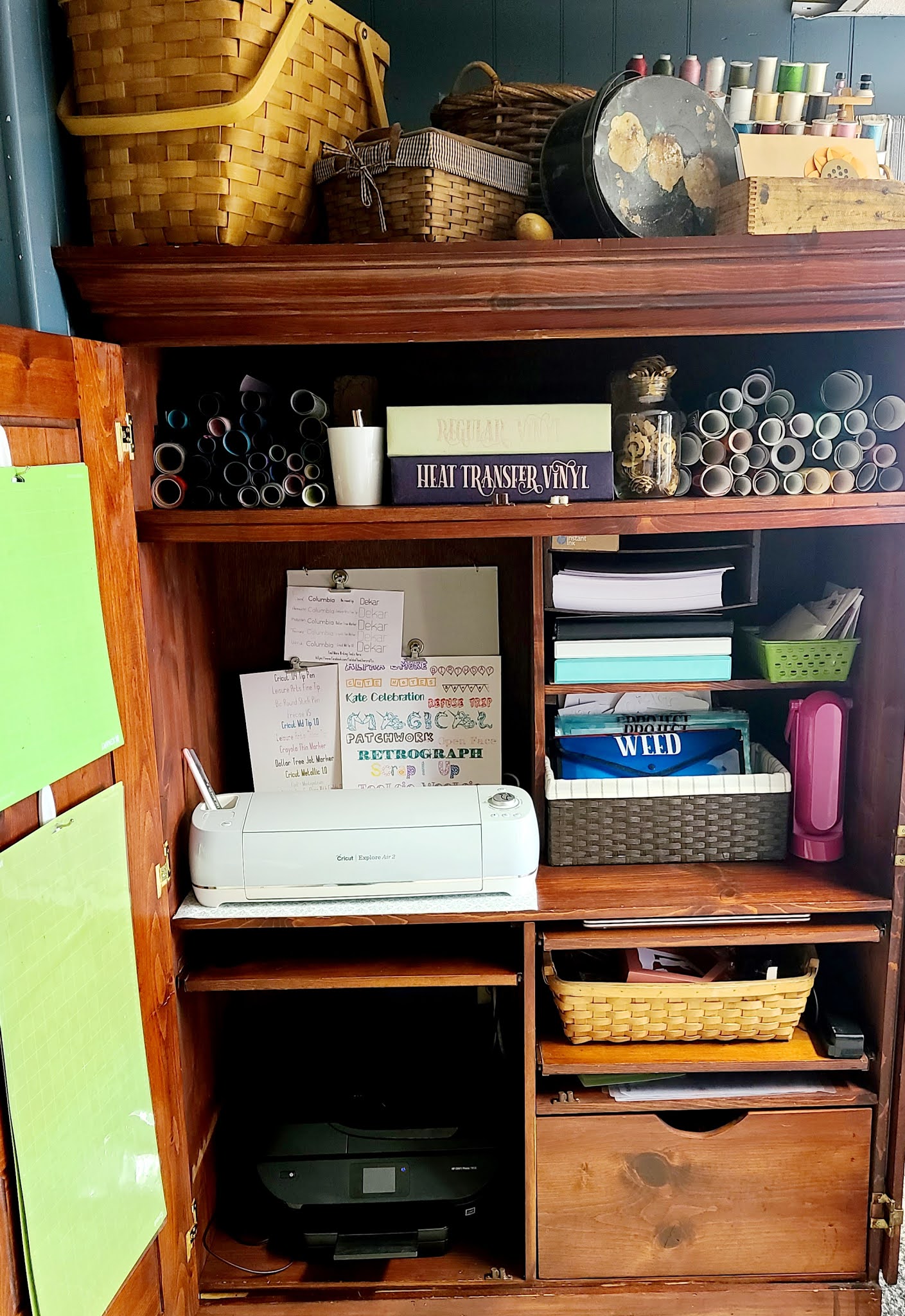
Today, all I can tell you is that I had to re-arrange my craft space to make room for another machine. I had just recently created this new space and got it set up exactly the way I wanted, and I loved it! So changing it... well, I'm not thrilled. But it's here, and a spot has been built for it. Hurdle #1 is cleared. I suspect however, that there's a long field of hurdles yet ahead.
==========================
On My Desk This Week - March 14th
"Egg-cellent Egg Decorator" Dollar Tree Aprons
HTV applied to a Dollar Tree Apron
Egg Dying Aprons For Kids
I was very surprised to find that these aprons do not melt when you apply htv! Quick presses, I didn't press nearly as long as I would for other fabrics. But I used the same heat setting I always do! [I use a regular old iron, set between cotton and wool, for all htv projects]
Supplies Used:
- Font is Bernard Mt Condensed
- SVG is FREE from Hellosvg
- Apron is from the craft section of Dollar Tree
- More Free Easter SVGS
On My Desk This Week - March 6th
I have kept my machine busy this week, and I have lots more planned for next week! Here's a look at some of what worked, and what didn't work, for me this past week.
Comparing Sites That Identify Fonts

Comparing Four Different Sites To Help You Identify Fonts
===================
The Cliff Notes on my results - I had the best results from What Font Is (NOT the same as What The Font.) Fontsquirrel did a terrible job matching the font, however, it's the one app that always recommends FREE alternatives. Most of the identifiers only show you paid fonts.
Quick Links:
- What Font Is was the clear winner - it correctly identified all three fonts
- More about using Fontlab Pad
- Where To Find Free Fonts
If you are on any cricut facebook groups, you have seen the daily question - What Is This Font? In some cases, like I Love Glitter, and Samantha, it can be obvious. But in most cases... it's pretty hard to tell! So many fonts have glyphs - which means the characters may look different. You can have two completely different versions of one letter in a font, if you use glyphs.
That said, there are sites that will help identify fonts. Tonight I took three different fonts from my collection and ran them through each site, to compare their results. What Font Is was the clear winner - it correctly identified all three fonts. What The Font came in second. Font Squirrel was the only site to offer free font suggestions.
And it's important to note that with Herina, the ligatures were not shown in the matched results. Had I not known that Herina was the correct font, I may not have believed the sites were accurate in their suggestion.
Here's a step by step of the fonts I used, and the results for each:
THE FONTS
Dollar Tree Kissing Booth
![]() |
| A Quick And Easy Dollar Tree "Kissing Booth" Valentine |
- Free SVG From Gina Creates
- Pack of mini dowels from The Dollar Tree
- Cardboard Box from the Dollar Tree
- Stuffed Frog from the Dollar Tree
- Hot Glue
- Vinyl
Find More Cricut Project Tutorials Here:
https://fieldsofhether.blogspot.com/2019/04/cricut-step-by-step-project-tutorials.html
==========================
5 Surprising Things I Learned When I Created A Cricut Facebook Group

I'm horrible at answering messages. Really, really horrible. I could apologize, but it would not be genuine. There are only 24 hours in a day, and there are SO very many fun and interesting things, in addition to the necessary things, that sorting through the various platforms to find messages and answer them is just never going to be a priority for me.
But I do love answering cricut questions and teaching people how to use their machines. So about a year ago I got the bright idea to create my own facebook group, where I can more easily answer questions, and compile assorted links and information in what I hoped would be helpful threads. On the whole, it's worked out very well for me. And along the way, I learned some things.. not important things, just interesting things.
1. Designers will offer their designs for free to a select group, as long as those who receive them make items with their designs and share them on a variety of facebook groups. This is how they get around the "self promotion" rule in most facebook groups. Personally, I don't have a problem with this at all. While my list does not allow you to post items or designs for sale, I do encourage you to share items you make. So if the designer gave you the design for free to promote their work, I don't mind if you make the item, share it, and tell where you got the design. But I do prefer you be honest - just say, I received this design for free in exchange for promoting it in facebook groups. As for how to be one of those who receive the free designs - I'm not certain, but I suspect that if you join the designers facebook group, that will be your best opportunity.
2. "Dope Logos" is a common term. Why "dope" logos, I don't know - but at least once a week I have to delete a spammer who goes through all the posts and comments "Do you want a Dope Logo?". Seriously - at least once a week. It's multiple people, and it's not unusual for them to post the comment on 10-30 posts in one night, before I get them blocked and removed. I suspect that although some of these may be legitimate designers, the majority will take your payment and never deliver a design. If you want an svg created, and are willing to pay, I always suggest you ask one of the many designers who provide the free designs I share. Many of them have contact information on their sites for custom work. I recommend supporting the designers who offer us so much for free. :-)
3. Spammers sometimes work in teams. Two or more spammers will join the same group with the specific intent of asking questions that that other can answer with "their favorite" designer, or shop. Super common is for someone to ask "which vinyl should I buy?" and then the co-spammer will immediately answer with a rave review for the brand they are being paid to promote. I always try to ask why someone likes a brand, and ask if they can show you examples of items they made with it.
4. People will promote items they have never used, telling you it's the "best", even though they have never tried it. I've had to block quite a few people over the past year for promoting one particular vinyl company that offers $5 for every referral. Many of these people would admit, when questioned, that they had never used the vinyl, but were promoting it for the $5 incentives. They will tell you how amazing this company is, without ever having ordered a single thing from them! This has become so annoying to me that I personally will never purchase from that company. Which isn't really fair, it's not the companies fault people have misused their promotion. If I see a great deal, or see something people are raving over, I'll share it. But if I haven't used it, I am honest about that - "I've never tried this, but I have heard", for instance.
5. People download legitimate free svgs, then upload them to Etsy and sell them as their own design. This I knew before I created my group - it was one of my very first "shocking" (to me) cricut lessons. I don't mean this happens once in awhile, in rare instances, I mean it's really, really super common. I am very slow to ever recommend someone purchase a design on Etsy, unless it's very unique, or unless I am familiar with the designers work and integrity. In many cases, you can find the design for free elsewhere, legitimately.
==============
My Cricut Craft Space - Projects In Progress
Quick Links:
- My [old] Cricut Craft Space (not yet updated since we've redone the room)
- How I Store My Vinyl Scraps (Also old - Same concept, but I now use two separate scrapbooks, and they are binder style instead of post style)
- Dollar Tree Plastic Folders - thicker, $1 each
- Dollar Tree Plastic Folders - thinner, 3 for $1
- Projects In Progress Printable Planner Sheet
- The font I used to label the folders is the free GT Herina. Be sure to use something other than Design space, such as the free fontlab pad, if you want to see those pretty ligatures appear.