Knock Out Name Tile - A Cricut Project

A Knock Out Name Tile 
These are so much easier to make now that cricut has added the offset feature in Design Space!

Candy Filled Valentine Doilies - Writing With Cricut


Cliff Notes:

This is one of those projects I made simply because I wanted to see how it works.  The doilies were cheap to practice on, and this did work quite well.


I used the Montepetrum font, and the triceratops came from a google search.

In design space, at the top of the screen, look for where it says "operation" and change it  to "draw", then choose "pen".

The hard part is placing the text properly on the mat.  I used the grids on the mat and a measuring tape.  I wanted the center of the writing to be in the center of the heart, so the center of the design needs to be at the 3 inch line on the mat.

After you click "make it", you can move your design around on the mat, placing it where you want it


The only other option I could think of is to create a heart the same size as the paper doily, group the text, and then sit and watch carefully, hitting pause on the machine as soon as the writing is complete, before it cuts.  But If the doily is not placed exactly, this still could be off, so I don't know that that method would be much better.  

If you are working from an ipad, there's an option for "snapmat" that does this for you.  It's not an option on computers, nor on android devices, as far as I can tell.

The new guide feature will not help with this.

I was hopeful that the new "Guide" option in Design space would help with this - but it does not.  You can change any item into a "guide", in the operations menu.  But it is only for design purposes, even if you attach your design to the guide, it does not transfer the guide to the mat when you make it, the text was still automatically placed at the top corner of the mat.


I used the Leisure Arts Marker - these were my favorites!  Although I love the Precise V5 for a finer point.  (Alternative  Markera for criciut - Comparison here)


To finish these, I used bakers twice to sew two paper doilies together.  Start at the top.  Leave a LONG tail of thread to tie a bow when done.  When About an inch or so remains unsewn, fill with candy, then finish sewing and tie in a bow.


=============================================================

Where to find free svgs for Valentines Day:
https://fieldsofhether.blogspot.com/2019/01/free-cut-files-for-valentines-day.html

More Cricut Tutorials & Step By Steps:
https://fieldsofhether.blogspot.com/2018/10/heathers-cricut-tutorials-step-by-steps.html

FREE fonts that work as writing fonts in cricut:
https://fieldsofhether.blogspot.com/2017/11/6-single-line-fonts-that-will-write.html

Find Me On Facebook
https://www.facebook.com/fieldsofheathercrafts

How To Transfer A Vinyl Design With "Transfer Tape"


Before & After - A Thrift Store Basket Redone With A Vinyl Design

Quick Tips:
  • My favorite transfer tape is Contact Paper From The Dollar Tree.  The same piece of transfer tape can be used over and over - many times.
  • Which Vinyl To Buy, & Where To Buy It 
  • Cricut Transfer tape is super strong, and works great for glitter vinyl, but is generally miserable to use for most regular projects. (and it's so much more expensive...I rarely recommend cricut materials.)
  • Peel at an angle

Cutting out a Design with your cricut machine essentially makes a sticker.  Once you make that sticker, you want to move it to your project - but you do not want to peel off each piece and place it as if you had bought a sheet of stickers..  that would not only be time consuming, but it would be much more difficult to line up properly.  To transfer your design, use transfer tape. 

Making Key Fobs with Cricut

Making Key Fobs With Cricut
You could cut these from faux leather as well.  Cricut could cut either for you - but honestly, it's so much faster and less mess to just use a rotary cutter, or even scissors.

Free Templates & Tutorials For Making Paper Flowers

Where To Find Free Templates & Tutorials For Making Paper Flowers 
It's much faster and easier to cut the large petals by hand - but cricut is great for making the centers, the leaves, and even the templates for cutting the larger petals.

Using FontLab Pad with Cricut Design Space

(you just need the free download)

In 2022, Design Space added what they call "kerned fonts".  This does not mean that the app reads font kerning - but it means that spacing issues with system fonts  are fixed, for the most part.  Occasionally you'll still have a font that does not display the way the designer intended.

And if a font has ligatures, Design Space will not be able to read them.

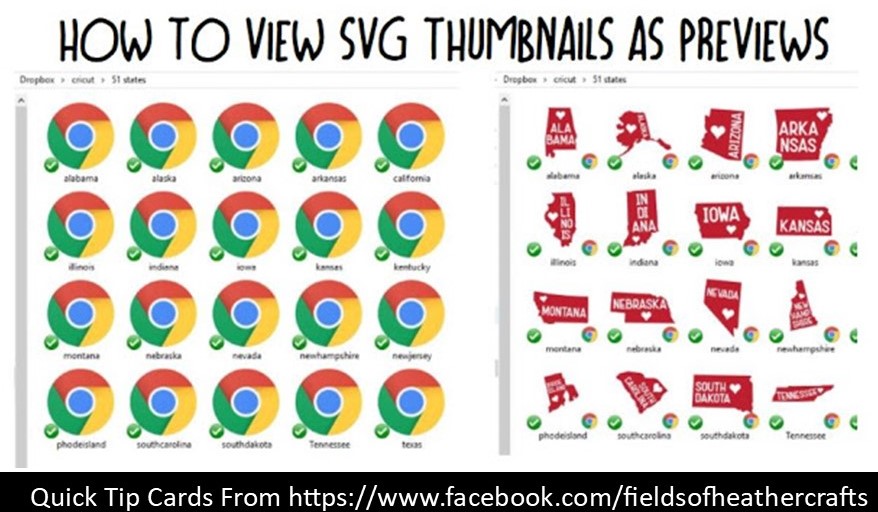
Quick Tip - You Can View Thumbnails Of SVG Files


How to View SVGS as Thumbnails on the Windows Operating System

The Cliff Notes Version - Use the svg viewer extension found here:
https://code.google.com/archive/p/svg-explorer-extension/downloads

OR Use Microsoft Power Toys Found here:
===================

I was running Windows 10 when I originally wrote this post, so my screenshots are based on that operating system, with chrome as my default browser.   I've used the extension with Windows 11, and more recently, I've used the PowerToys version, all working equally well. 


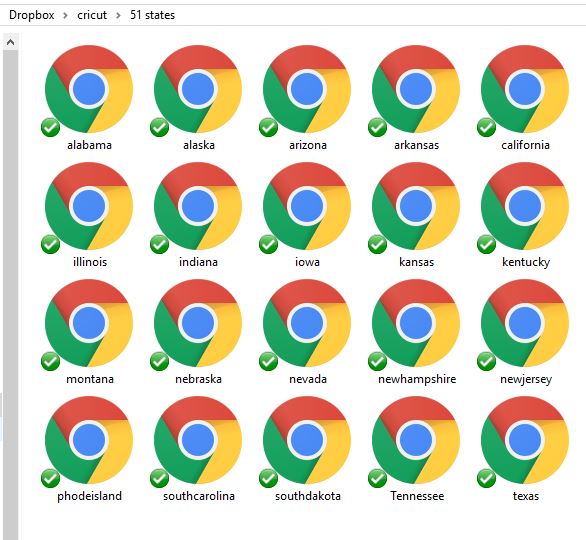
This has been driving me nuts since I first started working with my cricut machine earlier this fall.  My laptop displayed the thumbnails of svg files as Chrome icons (Chrome is my default web browser) and to see the file, I had to open it.  I really wanted to be able to browse through my collection of downloaded svgs, without opening each one.

==================
USING THE GOOGLE EXTENSION
=====================

A few google searches finally took me to an SVG viewer extension. 

Recently I purchased a new laptop, and this time I had to use the 3rd one down. If you are having issues, look for one that is not signed. 
The signed versions are now blocked on Windows 10.

NEW VERSIONS OF THE CODE ABOVE
Github has new versions of the code. 
Please note that I have not used these yet myself, as the one above worked fine.

Scroll down, or search for "assets", and the download links will be there.
the .sig refers to it being a signed version.  A signed version will no longer work on Windows 10, so the top version in this list is the one I would start with.


If you don't know if you are running 32bit or 64 bit, go to Control Panel (in your start menu, choose windows system, control panel will be in there) and click on System & Security:
Next choose "View The Amount Of Ram & Processor Speed"


And your answer will be under system - see system type?  Mine says 64 bit operating system, x64 based processor.
So I go to https://code.google.com/archive/p/svg-explorer-extension/downloads and download the 64 bit option.  This will download as an exe file.  Click on it to run it, follow the prompts.

And Voila - 


For my downloads folder, this was immediate - I didn't have to do anything else, once it was installed, I saw previews!  For my Dropbox folder (I back up all of my svg files and fonts in dropbox - sorted in folders by theme.  That way when I do something stupid like break my laptop, I still have access to everything on my new laptop... ) I had to restart my computer.

You may need to change your view settings - at the top left of the screen - to "icons" if you are  currently viewing in detail or list.


Make Sure Your View It Set To Allow Thumbnail View

If that did not work, make SURE that your views are not set to "always show icons never thumbnails"

Open any folder, choose view on the top left, then choose options on the right.
A box will pop up, choose view in that box, then make sure the box is NOT checked beside "always show icons never thumbnails"

=======================
USING MICROSOFT POWER TOYS 
========================
Find Microsoft Power Toys in the app store

I didn't have to do anything else, it was automatic once those were installed.  However, you can find this setting under Powertoys Settings/File Explorer Add-Ons, if you need to turn it on or off.


=======================

The 51 states  SVG collection is free here - https://caluyadesign.com/free-51-states-svg/
I used it as an example simply because it was the first folder in my files.  :-)


For more quick tip cards like this one, go here:

===========================

Facebook Page - For Tips, Tricks, & Free SVGS
 https://www.facebook.com/fieldsofheathercrafts/

Facebook Group- For Questions, Support, Sharing Projects, 
and LOADS More Free SVGS in themed posts with links in the comments
https://www.facebook.com/groups/1121399284857845
==================