Canada Crafts Studio Elephant Canvas

 
This design was in the 90% off sale in February 2022 - Making it $1.30.  

I've made other projects from this designer, and although I love them - they never have instructions, or even sizes - so it can take a little work to figure them out.  I think this is because many of the designs are made to be wall art - so the sizes would vary based on the space.


I wanted this to fit on a canvas that could be hung on a wall.  The canvas I used is 16x20.  I wouldn't want to make this much smaller - the smallest petals on the flowers here were about as small as I'd want to work with, personally.  

SUPPLIES USED:
  • 1 sheet black 12x12 cardstock
  • 1 sheet pink 12x12 cardstock
  • 1 sheet white 8.5x11 cardstock
  • 1 piece black vinyl (I used frisco matte black - it's my favorite)
  • String or ribbon.  I used grey bakers twine
  • The SVG, from Canada Crafts Studio.  Check both sites to see where it is cheapest this week - this one frequently goes on Sale.  Design Bundles   Creative Fabrica
The svg for this project will upload in two parts.  One part will be the elephant, the second part will be everything you need for one flower. (You will need 7 flowers to recreate this.)

ORIGINAL UPLOAD SIZE
Elephant 10.823 x 11.002
Flower pieces 11.686 x 10.829
If you cut it as is, the elephant will, obviously, be 10.823 x 11.002, and the flowers, when assembled, will be about 5 inches in diameter.

This is what my Design Space screen looked like once I had everything resized and duplicated.
To replicate this design in this color scheme, you'll duplicate the flower group 6 times - then change the color of 3 groups to black, 3 groups to pink, and one group to white.  Step By Step Details below:

RESIZED FOR 16x20 CANVAS

Select all of the flower group - petals, leaves, etc - all of it.
Resize to 6.006 x 5.565


There are 7 flowers for this canvas.  Duplicate the flower group 6 times.
Change the petals to Pink on 3 groups
Change the petals to Black on 3 groups
Change the petals to White on one group

All the black pieces cut from one 12x12 piece of cardstock, all of the pink from one 12x12 piece of pink.
For the White, you can easily use 8.5 x 11 cardstock - it didn't use much.

A closer look at how the petals are staggered on the flowers.

If you have never assembled flowers like this before, you may want to cut an extra one for practice.  They are super simple to assemble.
Fold all of the petals in half long ways, to add dimension.
Then apply one large petal to each side of the octagon base.  
Next, apply one medium petal, staggered over top.
Then apply the smallest petals last, again staggering them.  
Place the center of the flower in the palm of your hand, and curl your hand, so the sides of the center fold up.
Glue in the center.

On the white group, be sure to change the flower center to black.


I resized the elephant to 5.562 x 5.654
Then I changed the color of the elephant to grey, even though I cut it out of black vinyl.
Cricut will automatically send everything that is the same color to one mat - if the elephant is the same color as the flower, it will put them all on one mat.
Since I was cutting the flower from paper, and the elephant from vinyl, that wouldn't work for me.  A quick work around is to change the color of the elephant.  It doesn't matter what color you change it to, as long as you put black vinyl on the mat and load it into the machine, it will be black vinyl that cuts.  :-)

Painters tape helped to pick up all of the little pieces off the elephant when weeding it.

I looked at a variety of ways to add the string.  I considered painting fabric covered floral wire black.  I considered using a marker to draw the strings.  I considered waiting until I went to the store and looked for black ribbon.

In the end, I decided on grey bakers string that I had in my craft drawer.  I attached it to the back of each flower before I attached the flower to the canvas, leaving a very long tail.  Then I tied a knot and glued the knot to the elephants trunk.


The original design just uses 4 pieces of ribbon, on the four bottom flowers.

=================
As an affiliate for Design Bundles, Creative Fabrica, and Amazon, I may earn a small commission if you purchase items through the links on this page.  This will in no way effect your cost, but is a nice incentive for me to keep writing tutorials.  :-) 


From Penny Dreadfuls to Historical Fiction - Where History Is Lost To Story


These days when I finfish a book, the phrase "penny dreadfuls" comes to mind.  That does not mean the book was dreadful.  Quite the opposite! They were often thrilling reads, based on sensational stories. 


  Penny dreadfuls, popular from approximately 1830 into the 1890s a story published in weekly parts of 8 to 16 pages, each costing one penny.   The ‘dreadful’ part derived from the tendency of such works to dwell on murder, robbery and the seamy side of urban life.  In other words, they were not works that educated and uplifted. 

In the 1890s, Alfred Harmsworth began publishing half penny publications, with "more respectable" content.  Originally these were high minded moral tales. But before long, they too became dreadfuls, publishing stories similar to the originals.  So much so that A. A. Milne, the author of Winnie the Pooh, said, "Harmsworth killed the penny dreadful by the simple process of producing the 'ha'penny dreadfuller'".

Over time, the phrase "penny dreadfuls" came to refer to any  time wasting sensationalist fiction.

Today we have a tendency to regard reading as a superior activity, no matter what is being read.  Those of the Victorian Era would not have agreed. That didn't mean they wouldn't read the penny dreadfuls, merely that there was a distinction between quality literature that enhanced the mind, and sensational dreadfuls that merely entertained it.  One hundred years later, that distinction appears to be completely lost.

I read a lot of modern penny dreadfuls.  I love thrillers and murder mysteries.   I also love historical fiction.  More and more frequently however, I become a bit frustrated, because the line is so blurred.  I start out thinking I'm reading an account based on true history, and then find that I'm reading a thrilling tale of adventure and crime, with a mention of a historical event thrown in once or twice.

"Historical Fiction" can mean a lot of things.  I remember my grandmothers bodice ripper paperbacks being referred to as "historical fiction".   Adults around us would use that phrase with a smirk on their face, "Historical Fiction"  meant smut,  plain and simple.   Bodice rippers were  the 1980s version of penny dreadfuls, much more salacious than anyone could have dreamed would be commonly available in print, in 1880.  By definition, those bodice rippers (so named for the photos on the covers)  are true historical fiction. 

"Historical fiction is a literary genre where the story takes place in the past. Historical novels capture the details of the time period as accurately as possible for authenticity, including social norms, manners, customs, and traditions. Many novels in this genre tell fictional stories that involve actual historical figures or historical events."

In other words, I expect too much when I read a book labeled Historical Fiction. 

We need another category.  Something between Non Fiction and Historical Fiction, where the historical events are researched and portrayed accurately, but extra fictional characters are added in, or an additional modern story line is added with historical flashbacks, preserving the integrity of the history.   

The historical fiction most of us are reading today is, in my mind,  more dangerous than the smut our parents were hiding from us 50 years ago.  Todays historical fiction distorts  history completely.  [ahem.... Marie Benedict.  Although perhaps it is unfair to call her out, she's far from alone - she just happens to write about a lot of my favorite Pennsylvania based subjects, and therefore draws my ire more than most.] 

 Actual historical events as we know them have been distorted and sensationalized until  there is no distinction between fact and fiction.   It's hard not to confuse the two even when you have read the historical background.  Stories make an impact, facts are forgotten. That's just our nature.  

We start to believe that we are reading noble, educational,  works, learning as we are entertained, when in fact, we're all reading nothing more than penny dreadfuls.  Even worse, history is being rewritten in our minds, facts completely lost in exchange for salacious stories. 

That seems  unnecessary, when you realize how many salacious stories already fill our factual history. 


Pop Up Monster Valentines - And An Envelope to hold them

 
These Pop Up Love Monster Valentines are from a new to me designer.  The svg was not free, but it's a great quick and easy design.  My two year old grandson did most of the gluing today, on all 8 of the cards we made.

Find the svg here:

Monster Heart Popper Valentines - A Cricut Craft


My just turned two year old grandson is spending some time with me this week, and we wanted to make Valentines.  As he sat on my lap looking at option, he quickly chose ones with poppers attached.  The ones we saw had printable tags though, and he's at an age where he REALLY loves using a glue stick.

  When looking for an option he could glue, he spotted this heart monster.  It wasn't an svg, but it was something I could easily make with shapes in Design Space.  By adding a small circle at the bottom, we could thread the popper keychains through to attach them.  
I used simple shapes to create this in design space.  Since I did not upload anything at all, I can share the project with you, so although it's not an svg, if you use Design Space, you can open the project and make it just as if you had designed it yourself.


When you click on a design space link, like the one above, a screen will pop up asking if you would like to open it in the Design Space app.  Once you "open in app", it will open your Design Space.  

I included eyes in the design, but we chose to use googly eyes instead.  Because...  googly eyes.  :-)   I glued the teeth and tongue to the top layer, because that placement was a bit much for a two year old.  He glued the two large layers together, and glued and placed the eyes.


He enjoyed picking the cardstock too.  I gave him limited selections, but he chose what colors to use.

Although he does quite well with a glue stick, our 2 year old grandson cannot yet write, so I added the To and From in Design Space - and I also filled in those fields.  I used the Always Here font, which writes well with the pens in cricut.  Don't forget to change the text to "draw", and then attach it to the heart.


More Options:
---------------------------

Popper Bracelets

=================
FREE PRINTABLE TAGS
===============

https://www.passionforsavings.com/you-make-my-heart-pop-printable/

https://www.thedenverhousewife.com/2022/01/pop-it-valentines/

https://sprinkledwithpaper.net/pop-it-free-printable-valentines/

https://www.skiptomylou.org/pop-it-printable-valentine-cards/


Welcome Home Daddy Shirt - Combining & Modifying Different Free SVGS

 
Our son arrived back on US soil very early this morning. I'm not completely sure our just turned 2 year old grandson fully understands that Daddy will actually be here in person to pick him up tonight, not just on a phone screen, but he is very excited about the dinosaur he picked out for on his shirt.


When working with real, quality, svgs, it's so simple to use just certain elements.  For this, I deleted the hearts and text, used contour to remove the "means" from the banner.

I sliced the eye out of the dinosaur shape, so it would be one less layer to apply.  I'm putting this on a white shirt, so the white can show through, no need to use white htv on top.

Then I chose select all, and flipped the design horizontal, and  changed the colors to fit our patriotic theme.

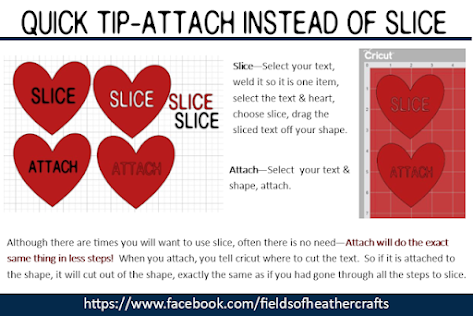
Next, I typed "Daddy" to fit in the banner, then sliced it from the banner.  I did not need to slice this - I could have just attached.  Often attach will work exactly the same as slice, in fewer steps, and this is one of those times.  But I sliced it so I could share a screenshot of the design to show my daughter what it would look like, and get her opinion.  


Next I added this free American Flag svg.

This is my favorite flag svg - because it's easy to weed and layer. To help weed  out the stars, I use painters tape - roll it in a circle around my finger, then dab the area, so the star pieces are picked up by the tape.


For the font, I used Biosha Caps.  I downloaded the Biosha fonts a couple of years ago when they were temporarily free, and this set of fonts is hands down my most used fonts.


I used the curve feature in Design Space to slightly curve the Welcome Home.

Next I decided I would rather waste a little vinyl than take the time to piece and line up the design. Here's the difference:

If I had just clicked "make it", without attaching, Design Space would line all the red pieces up like this.  Once weeded, I would need to place them correctly on the shirt.

By selecting all of the red pieces and then choosing "Attach", Design Space keeps all of the red pieces exactly in place.  It wasted a little more vinyl, but makes it so much faster to apply to the shirt.

My favorite htv is Caregy, or transwonder.  They are much more inexpensive than Cricut brand, and I find the quality to be much better. 
I keep a vinyl comparison price chart here:

Because this is being cut from HTV, to apply to fabric, I needed to Mirror the design.  For htv, you are actually cutting on the back of the vinyl, so the image needs to be reversed.  I do not trust myself to remember to click the mirror button, so for all htv projects, I click select all, then flip horizontal.  

I cut this using my Maker, and again, I'm just not impressed with this machine. Compared to my Air 2, it is just much more inconsistent in it's cuts.  Here you can see it cut the red htv quite well, then cut through the backing of the blue htv in places, making it harder to weed and apply.  

This is the transfer sheet, after I ironed on the design.  This should not happen.  Yes, I can change the settings so it cuts with "less pressure", but then it wouldn't have cut all the way through on the first piece.  The machine is extremely inconsistent - I don't have this problem every time.  

Here's a more detailed look at my experiences with the Air 2 and the Maker, and why I generally recommend the Air 2 machine over the Maker.  

I ironed the blue pieces on first, then applied the red.  
As always, I just used a regular iron - I don't bother with a heat press, nor an easy press, because I have never had any issues just using a regular old iron.  Here's more about how I use a regular old thrift store iron for my htv projects:

==============================